FIND THE FILM ON PAPER
Prepare it in detail – and stay ready for what the work discovers.
Shot list, script breakdown and shooting schedule for cinematographers and directors
– on Mac and iPad.
Free to try on Mac and iPad. One purchase unlocks both.
CINEside is where the film's visual language takes shape – inside the screenplay, scene by scene. Shot list, script, references, and department notes in one place, built for cinematographers and directors preparing narrative work. It translates emotional intention into the technical notes you need to prep and shoot, and gives every department exactly its part – so the decisions stay creative ones, not ones made by a schedule or a budget.
Your director sketches the shot on a napkin at dinner. You photograph it. It's anchored to scene 12 in the blink of an eye.
It works completely offline – no AI, no cloud, no subscription. Your script doesn't have to leave your computer.
What it does
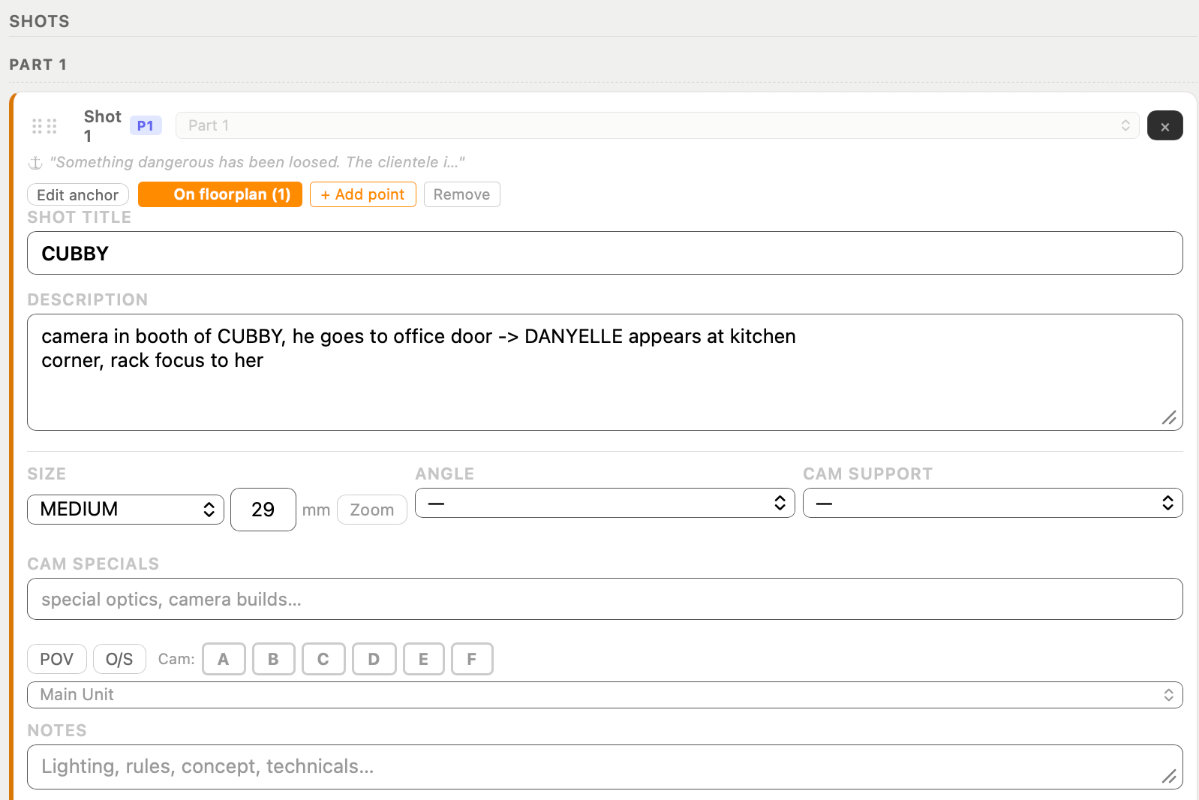
Shot cards, can be anchored to the script
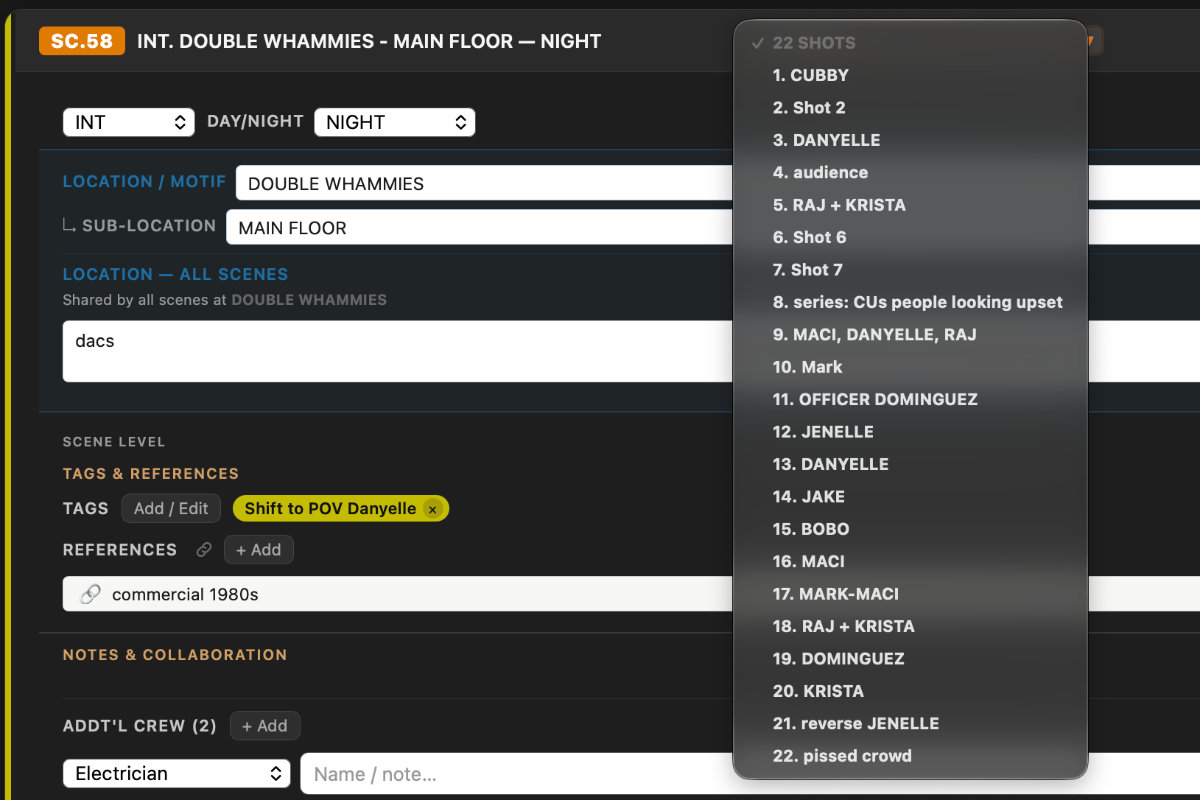
Scene header and shots at a glance
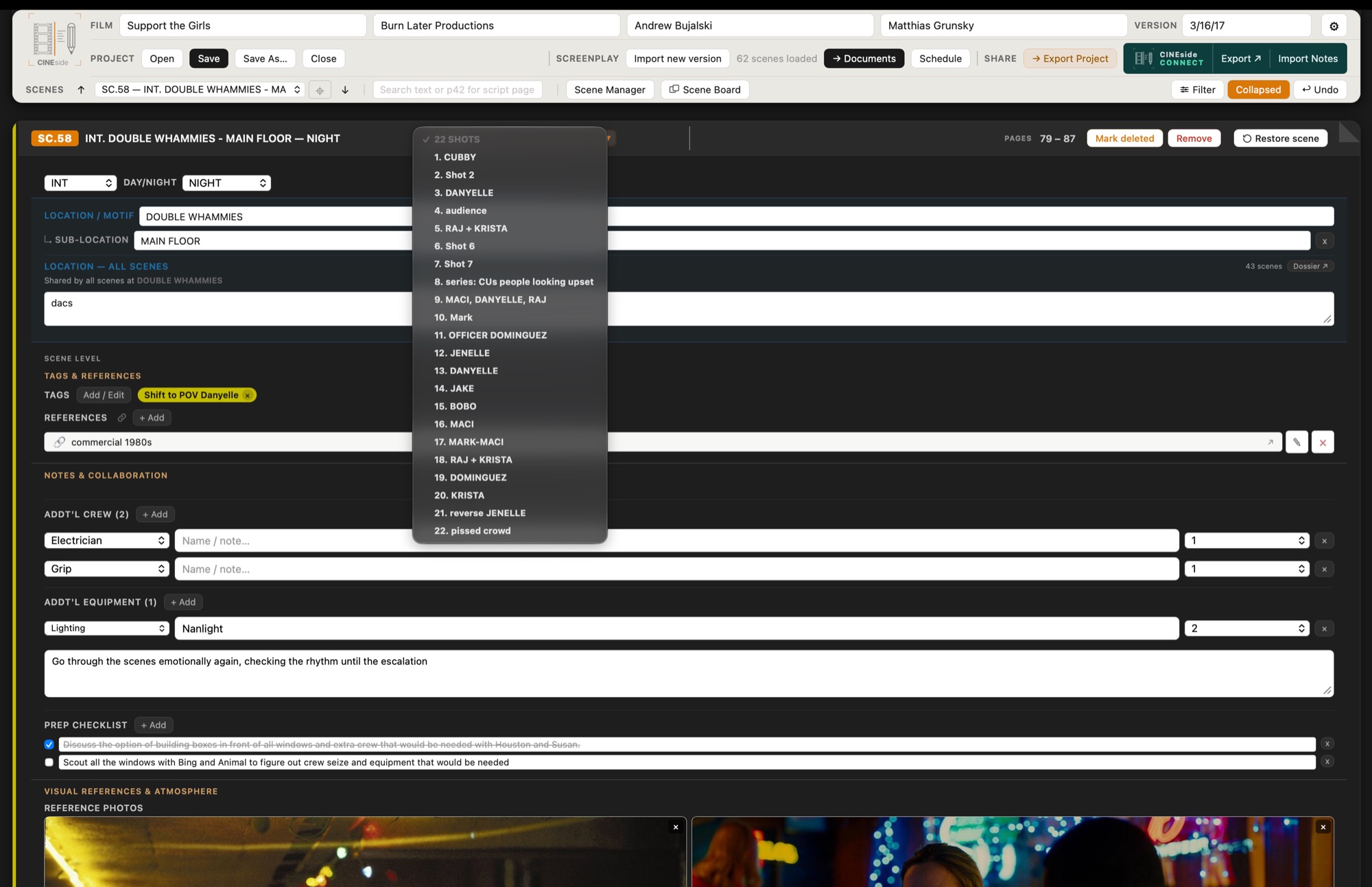
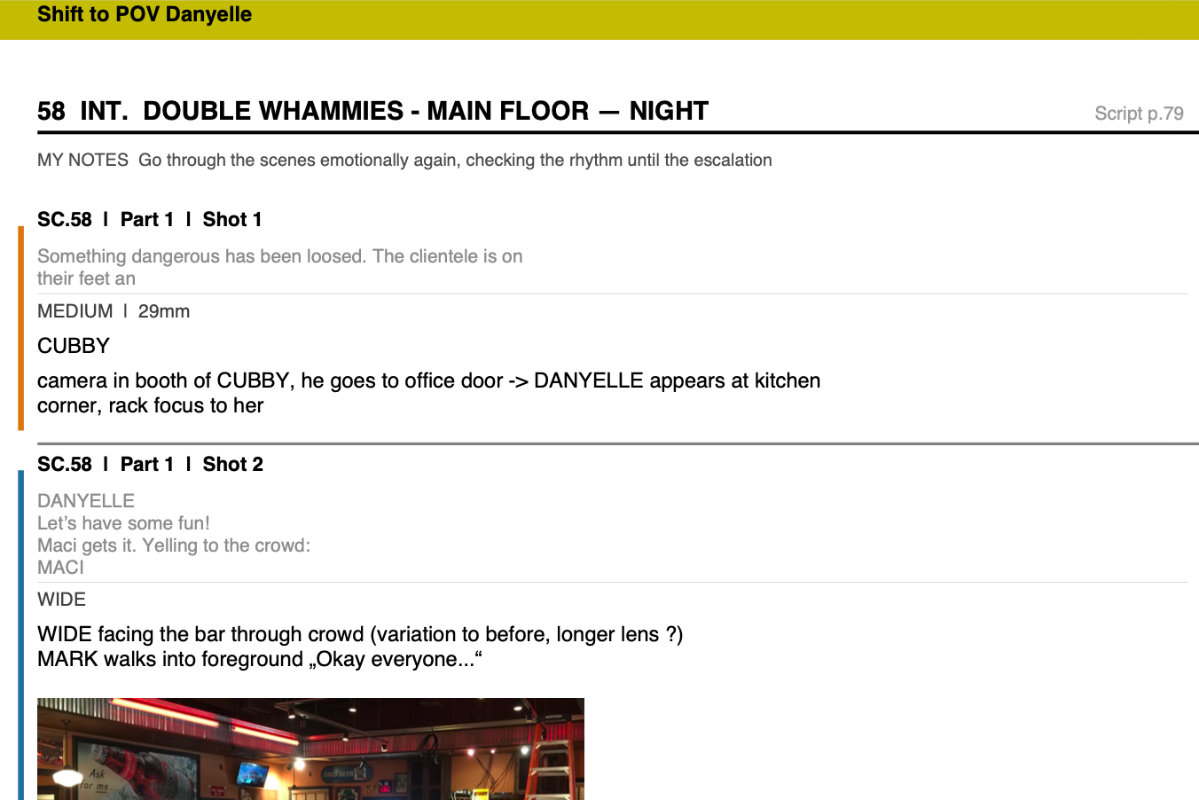
Export PDF for the crew
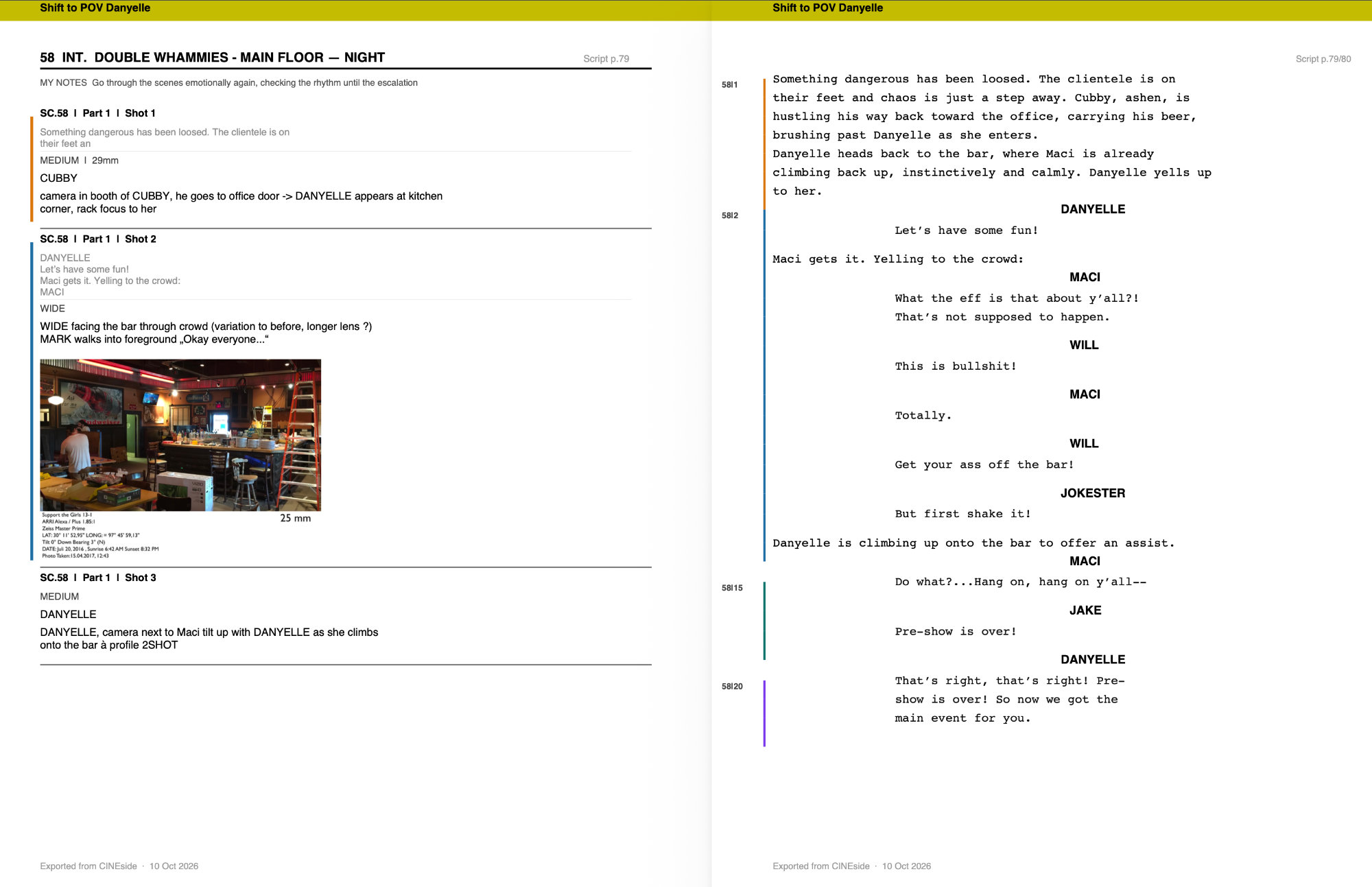
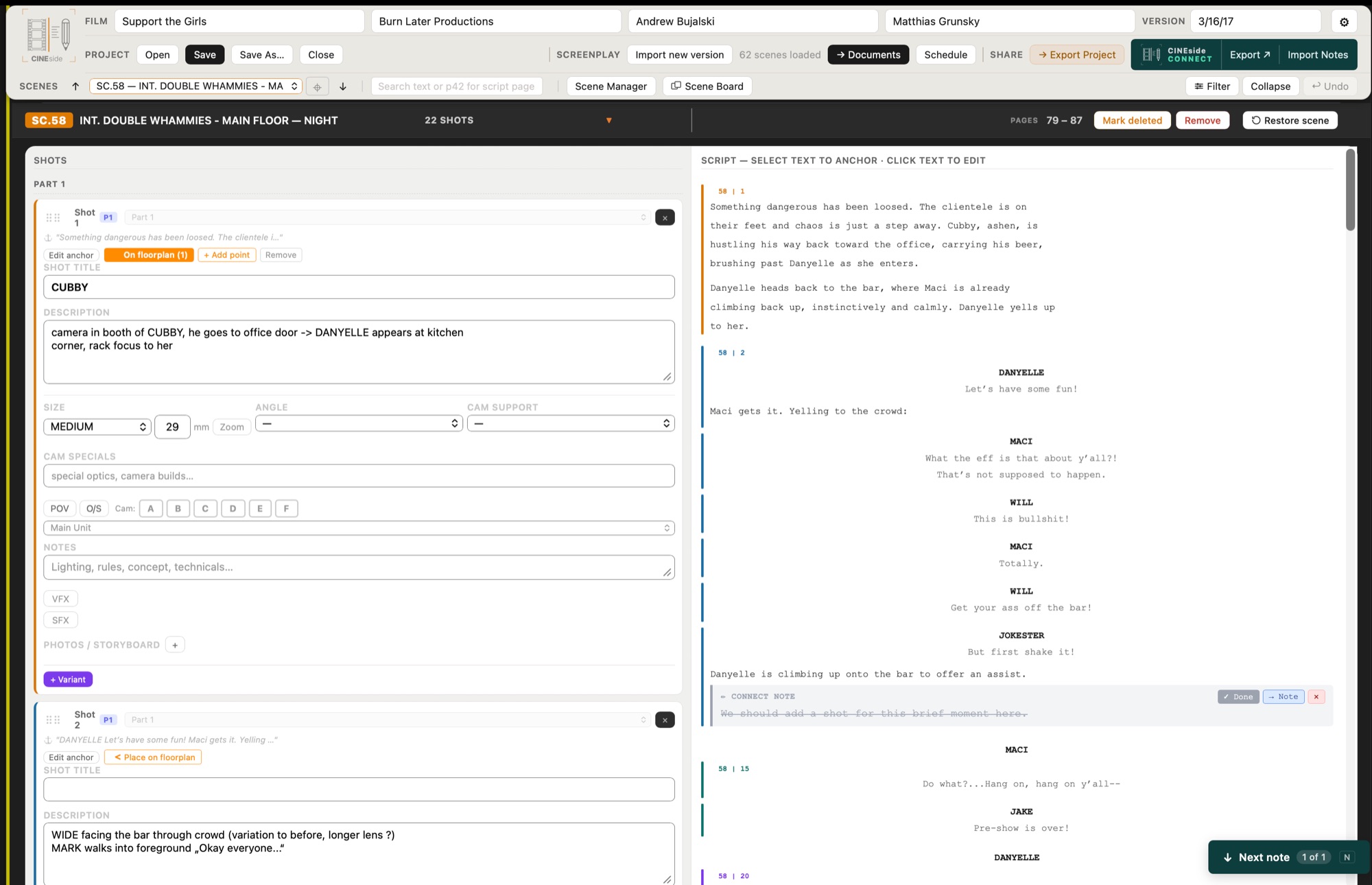
CINEside is built around the screenplay. Your script sits on the right, your shots and notes on the left, and everything stays anchored to the scenes it belongs to.
Develop the visual language
- Import screenplays as PDF and let CINEside detect your scenes automatically
- When a revised draft arrives, import the new version – CINEside matches the scenes and keeps your shots, notes, photos, and anchors attached. Anything that can't be matched is flagged, and you re-anchor it in seconds.
- Anchor shots to specific passages in the script – or assign any script block to an existing shot
- Attach reference photos, location images, sun position diagrams, floorplans, and storyboards — per scene and per shot
- Place camera, character, light, and grip anchors directly on floorplans and lighting plans — mark positions, rotation, and coverage right where they happen
- Open the Scene Board – a dedicated second window showing all visual references for the current scene. Works on a second monitor or iPad via Sidecar.
- Keep everything together – each project saves as a self-contained folder with all references and backups included.
Turn it into a plan
- Build your shot list with size, angle, lens, camera move, POV/OS, multi-camera setup, unit assignment
- Color-tag scenes across the whole project – visual groupings for locations, blocks, shooting days, or anything else
- Filter the scene list down to what you're working on right now – Interior/Exterior, Day/Night, camera support, VFX/SFX, unit, and more – and carry the same filter straight into your exports
- Flag VFX and SFX shots and export separate shot lists for post production
- Build a multi-day shooting schedule – assign scenes to shoot days, drag and drop shots into order, and export a complete schedule per day or across all shoot days
Get it to the right people
- Add notes for specific departments: Director, Gaffer, Art Department, Costume, Make Up, Key Grip, and more
- Generate a Location Dossier for tech scouts – notes, photos, floorplan, and all scenes per location in one document
- Export your shot list optimised for iPad – larger text, and a labeled write-in notes box with a dot grid after each shot for Apple Pencil annotations
- Export your complete shooting script as a facing-pages PDF, shot list only, or notes sheet
- Share your work with one click via CINEside CONNECT
One preparation, many recipients
The same prep work feeds everyone: the art department gets the location photos, the AD gets the shot order and the day's schedule, the gaffer gets lighting plans and additional equipment, production gets the additional crew needs. Each department receives exactly its part – as a clean PDF, ready for the next meeting.
The interface is the paper
White, neutral, out of the way. CINEside doesn't try to create a mood – your images do that. It's built to hold your work, not to present itself.
Yours to keep
One-time purchase. No AI, no cloud, no subscription.
Just your work
CINEside keeps your preparation organized – nothing more. It doesn't generate ideas, suggest shots, or have an opinion about your visual language. That's entirely yours.
Works the way you actually work
CINEside adapts to how the project is structured. In Cinematographer mode, the interface shows everything – lighting plans, sun position, crew and equipment notes, department discussions. In Director mode, it rearranges around a different workflow: lighting and equipment give way to discussion notes for screenwriter, casting, actors, editor, and composer.
When you're ready to share, export a share package with one click. The other person receives a single .cnsf file – it contains the project and all references. They open it in CINEside and it becomes a normal editable project on their machine. Nothing gets lost in transit.
Try before you buy
Download CINEside and work through a real scene with your own screenplay – import the PDF, plan your shots, add references, draft your department notes. Three things are disabled in Demo Mode: saving your project as a .cnsd file, exporting to CONNECT for your collaborator, and sharing a project as .cnsf. Everything else works – including the Schedule. PDF exports work, but are watermarked.
Share your work — CINEside CONNECT
Export your shooting script with one click. The other person opens it in CINEside CONNECT – a free companion app – adds their notes to shots, script passages, and images, and sends it back. You import the notes into CINEside and see all their feedback highlighted in context. CONNECT is read-only, works completely offline, and is free for all collaborators.
Mac and iPad
The same app on both. Prep at the desk on the Mac, take it along on the iPad – on location, at the tech scout, at dinner when the napkin comes out – and pick up where you left off on either. Projects move between the two as files; everything travels with them, including photos, references and department notes. One purchase unlocks both.
Get CINEside
CINEside for Mac & iPad
One-time purchase — $129 / 149 €
See the App Store for exact pricing in your region. No subscription. Buy on Mac or iPad, then tap Restore Purchases on the other. Universal app – runs natively on Intel and Apple Silicon. macOS 10.13 (2017) or newer · iPadOS 15 or newer.
Free to try with your own screenplay — saving, sharing, and unwatermarked PDF unlock with the full version.

CINEside CONNECT for Mac & iPad
Free
For directors, cinematographers, and collaborators. Open a project file sent from CINEside, review shot list, script, and photos scene by scene, add your notes and send them back. Works offline, no account needed. Universal app, macOS 10.13 (2017) or newer · iPadOS 15 or newer.
About
CINEside comes from Matthias Grunsky, a cinematographer based in Munich and working internationally. The tool grew out of his own preparation work – especially for shoots where director and DP start working across time zones, long before meeting physically for the real prep time. The quiet, methodical process that shapes how a scene eventually looks on screen.
All walkthrough videos are also available on Vimeo.
Auf Deutsch
CINEside stammt von Matthias Grunsky, einem in München ansässigen und international tätigen Kameramann. Das Tool entstand aus seiner eigenen Vorbereitungsarbeit – insbesondere für Dreharbeiten, bei denen Regisseur und Kameramann bereits lange vor dem persönlichen Treffen zur eigentlichen Vorbereitung über verschiedene Zeitzonen hinweg zusammenarbeiten. Ein ruhiger, methodischer Prozess, der darüber entscheidet, wie eine Szene letztendlich auf der Leinwand wirkt.
Alle Walkthrough-Videos sind auch auf Vimeo verfügbar.
Latest Updates | October 2026
CINEside v1.8.31
- Script import recognises many more heading styles: INT.KITCHEN, INT./EXT., time of day after a full stop, headings without a scene number or standard time of day, French (INT/JOUR, FIN DE JOURNÉE), German slash format (01 WOHNUNG / INNEN / TAG:), INT/EXT after the location, and numbered headings without INT/EXT (17 MONTAGE).
- Omitted scenes (31 OMITTED) keep their number and are imported as deleted, so the numbering has no gaps.
- Scene numbers split into pieces by the PDF, short numbered scenes, page numbers in the footer and revision marks (*) in the margin are now handled correctly.
- Scenes keep the order of the script; the Scene Manager flags repeated scene numbers. Numbers such as 1-2 / 1-10 sort correctly.
- Re-importing the same PDF no longer marks unchanged scenes as changed, and part dividers stay on their line, so shots no longer move to the wrong part. An omitted scene that returns is matched by number; a scene that becomes omitted keeps its shots.
- Scenes without INT/EXT show without a stray full stop; the shot list and PDF exports no longer add “INT.” where the script has none.
CINEside for iPad v1.2.10
- Smoother scrolling throughout: Lock and Collapse keep your reading position, the keyboard no longer pushes fields out of view, and shot and script columns stay in sync.
- Picking a shot or scene from the dropdown, the arrows or “Next note” no longer jumps back after a moment.
- Projects saved on the Mac now show Soft Sources, Tubes and Lanterns with their correct symbols – and keep them when saved on the iPad.
- The dark bar under the status line stays in place, also while the keyboard is open.
- Settings, Scene Manager and the photo lightbox no longer scroll the page behind them.
CINEside v1.8.30
- Sun Position photos now use the full width of their column.
- The scene header no longer disappears under the app header at narrower window widths – the header height is now measured live instead of assumed.
- Fixes a jump after resizing the window.
CINEside CONNECT for iPad v1.0.4
- PDF export: line breaks in shot descriptions, notes and script notes are now kept in the PDF.
- Scene headers and the cover page turn a line break into a space.
CINEside CONNECT v0.3.5
- PDF export: line breaks in shot descriptions, notes and script notes are now kept in the PDF. Previously words at a line break could run together.
- Scene headers and the cover page turn a line break into a space.
- Page layout accounts for multi-line notes.
- Sun Position photos now use the full width of their column.
- The scene header no longer disappears under the app header at narrower window widths – the header height is now measured live instead of assumed.
- Fixes a jump after resizing the window.
CINEside CONNECT for iPad v1.0.4
- PDF export: line breaks in shot descriptions, notes and script notes are now kept in the PDF.
- Scene headers and the cover page turn a line break into a space.
CINEside CONNECT v0.3.5
- PDF export: line breaks in shot descriptions, notes and script notes are now kept in the PDF. Previously words at a line break could run together.
- Scene headers and the cover page turn a line break into a space.
- Page layout accounts for multi-line notes.
© 2026 Matthias Grunsky · CINEside